Can you help me write a product description for a sustainable water bottle?
✨
I would be happy to help! Here's a compelling product description:
EcoFlow Hydration Bottle
Stay refreshed while staying sustainable. Our triple-insulated stainless steel bottle keeps drinks cold for 24 hours or hot for 12. Made from 100% recycled materials with a lifetime warranty. One bottle saves 167 plastic bottles per year.
Copilot is thinking...
About AI-Native UI
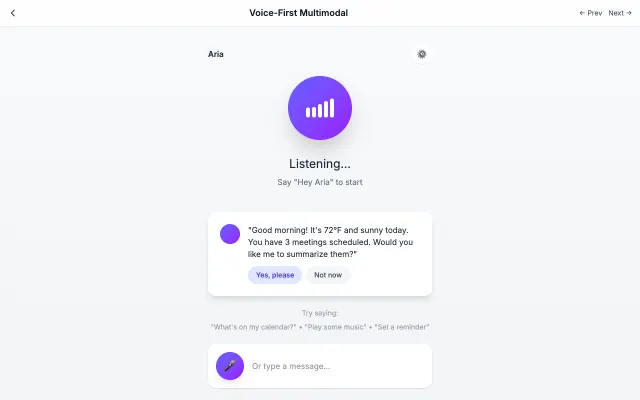
Designed specifically for AI interactions. Features conversational layouts, streaming text, and minimal interface chrome.
Center a single conversation column around 48rem wide with the message composer docked at the bottom
Render the thread in an element with role="log" and aria-live="polite"; assistant replies in white rounded cards
Stream replies token by token via fetch ReadableStream or Server-Sent Events; with no backend, reveal the existing reply word by word on load
Show a three-dot typing indicator (gray dots pulsing opacity 0.4 to 1, staggered) only while a reply is pending; hide it once rendered
Put reply actions such as Copy, Regenerate and Make shorter as small pill buttons under each answer
Reserve the indigo-to-violet gradient for the assistant avatar and send button; keep other chrome light gray
Use AI-Native UI with an AI coding agent
Paste this into Claude Code, Cursor, v0, Lovable or any coding agent to restyle a page in AI-Native UI.
AI prompt · 20 lines
Apply the AI-Native UI style to this interface.

What it is: Designed specifically for AI interactions. Features conversational layouts, streaming text, and minimal interface chrome.
Look and feel: Chatbot, Conversational, Voice, Assistant, Minimal chrome, Streaming text.
Colors: primary #6366F1, #10B981, #F5F5F5; secondary #8B5CF6, #3B82F6.
Effects and motion: Typing indicators (3-dot pulse), streaming text animations, pulse animations, context cards.

How to build it:
- Center a single conversation column around 48rem wide with the message composer docked at the bottom
- Render the thread in an element with role="log" and aria-live="polite"; assistant replies in white rounded cards
- Stream replies token by token via fetch ReadableStream or Server-Sent Events; with no backend, reveal the existing reply word by word on load
- Show a three-dot typing indicator (gray dots pulsing opacity 0.4 to 1, staggered) only while a reply is pending; hide it once rendered
- Put reply actions such as Copy, Regenerate and Make shorter as small pill buttons under each answer
- Reserve the indigo-to-violet gradient for the assistant avatar and send button; keep other chrome light gray

Works best for: AI products, Chatbots, Voice assistants, Copilots, AI-powered tools.
Avoid it for: Traditional forms, Data-heavy dashboards, Print-first content. If this product falls into one of those, say so before restyling.

Restructure the layout where this style calls for it, keeping the existing content and behaviour. Use only content already on the page: if a step needs testimonials, pricing, data, images or media that don't exist, skip that step instead of adding placeholders or inventing it.
Meet WCAG AA contrast: where a palette color is too light or bright for text, keep it for backgrounds, borders and large display type and use a darker text color, rather than darkening the whole design. Keep visible focus states, give icon-only controls an accessible name (aria-label) and respect prefers-reduced-motion.