ALTITUDE
408 KM
● NOMINAL
VELOCITY
7.66 KM/S
● OPTIMAL
CREW STATUS
6 ACTIVE
● HEALTHY
ORBITAL TRAJECTORY
Inspired by movie FUI (Fantasy User Interfaces). Features thin lines, neon colors, and technical data visualization.
Live demo
ALTITUDE
408 KM
● NOMINAL
VELOCITY
7.66 KM/S
● OPTIMAL
CREW STATUS
6 ACTIVE
● HEALTHY
ORBITAL TRAJECTORY
Inspired by movie FUI (Fantasy User Interfaces). Features thin lines, neon colors, and technical data visualization.
2010s Sci-Fi
Effects: Glow effects, scanning animations, ticker text, blinking markers, fine line drawing
:root {
  --cyan: #00FFFF;
  --blue: #0080FF;
  --alert: #FF0000;
  --bg: #0A0F1C;
  --ok: #00FF00;
  --line: rgb(0 255 255 / 0.3);
}

body {
  background-color: var(--bg);
  background-image:
    linear-gradient(rgb(0 255 255 / 0.04) 1px, transparent 1px),
    linear-gradient(90deg, rgb(0 255 255 / 0.04) 1px, transparent 1px);
  background-size: 50px 50px;
  color: var(--cyan);
  font-family: "JetBrains Mono", ui-monospace, monospace;
}

.panel {
  position: relative;
  padding: 1.5rem;
  border: 1px solid var(--line);
  background: rgb(0 255 255 / 0.05);
}

/* One pair of corner brackets per panel; don't stack extra corner decorations */
.panel::before,
.panel::after {
  content: "";
  position: absolute;
  width: 1rem;
  height: 1rem;
  border: 0 solid var(--cyan);
}

.panel::before { top: 0.5rem; left: 0.5rem; border-width: 1px 0 0 1px; }
.panel::after { right: 0.5rem; bottom: 0.5rem; border-width: 0 1px 1px 0; }

.label {
  font-size: 0.75rem;
  letter-spacing: 0.1em;
  text-transform: uppercase;
  color: rgb(0 255 255 / 0.7);
}

.readout {
  font-size: 1.875rem;
  text-shadow: 0 0 10px rgb(0 255 255 / 0.5);
}

/* Blink only decorative markers like this dot, never readable text */
.status-dot {
  display: inline-block;
  width: 0.75rem;
  height: 0.75rem;
  border-radius: 50%;
  background: var(--cyan);
  box-shadow: 0 0 10px var(--cyan);
  animation: blink 2s cubic-bezier(0.4, 0, 0.6, 1) infinite;
}

.button {
  padding: 0.75rem 2rem;
  border: 1px solid rgb(0 255 255 / 0.5);
  background: rgb(0 255 255 / 0.1);
  color: var(--cyan);
  font-family: inherit;
  text-transform: uppercase;
}

.button:hover,
.button--primary {
  background: var(--cyan);
  color: var(--bg);
  box-shadow: 0 0 16px rgb(0 255 255 / 0.6);
}

.button--danger { border-color: var(--alert); color: #FF4D4D; }
.button:focus-visible { outline: 2px solid var(--cyan); outline-offset: 4px; }

/* Ticker: one copy of the text scrolls in from the right edge, no duplicates needed */
.ticker { overflow: hidden; white-space: nowrap; border-block: 1px solid var(--line); }
.ticker-track { display: inline-block; padding-left: 100%; animation: ticker 30s linear infinite; }

/* Fine line drawing: give each SVG path pathLength="1" */
.line-draw path {
  fill: none;
  stroke: var(--cyan);
  stroke-dasharray: 1;
  stroke-dashoffset: 1;
  animation: draw 2s ease-out forwards;
}

@keyframes ticker { to { transform: translateX(-100%); } }
@keyframes draw { to { stroke-dashoffset: 0; } }
@keyframes blink { 50% { opacity: 0.4; } }

@media (prefers-reduced-motion: reduce) {
  .status-dot,
  .ticker-track,
  .line-draw path { animation: none; }
  .ticker-track { padding-left: 0; }
  .line-draw path { stroke-dashoffset: 0; }
}Paste this into Claude Code, Cursor, v0, Lovable or any coding agent to restyle a page in HUD / Sci-Fi FUI.
Apply the HUD / Sci-Fi FUI style to this interface.

What it is: Inspired by movie FUI (Fantasy User Interfaces). Features thin lines, neon colors, and technical data visualization.
Look and feel: Futuristic, Technical, Wireframe, Neon, Transparent, Iron Man, Sci-fi.
Colors: primary #00FFFF, #0080FF, #FF0000; secondary #0A0F1C, #00FF00.
Effects and motion: Glow effects, scanning animations, ticker text, blinking markers, fine line drawing.

Reference CSS (put these class names on the matching elements, or map them onto existing components and class names; avoid long structural selectors):
```css
:root {
  --cyan: #00FFFF;
  --blue: #0080FF;
  --alert: #FF0000;
  --bg: #0A0F1C;
  --ok: #00FF00;
  --line: rgb(0 255 255 / 0.3);
}

body {
  background-color: var(--bg);
  background-image:
    linear-gradient(rgb(0 255 255 / 0.04) 1px, transparent 1px),
    linear-gradient(90deg, rgb(0 255 255 / 0.04) 1px, transparent 1px);
  background-size: 50px 50px;
  color: var(--cyan);
  font-family: "JetBrains Mono", ui-monospace, monospace;
}

.panel {
  position: relative;
  padding: 1.5rem;
  border: 1px solid var(--line);
  background: rgb(0 255 255 / 0.05);
}

/* One pair of corner brackets per panel; don't stack extra corner decorations */
.panel::before,
.panel::after {
  content: "";
  position: absolute;
  width: 1rem;
  height: 1rem;
  border: 0 solid var(--cyan);
}

.panel::before { top: 0.5rem; left: 0.5rem; border-width: 1px 0 0 1px; }
.panel::after { right: 0.5rem; bottom: 0.5rem; border-width: 0 1px 1px 0; }

.label {
  font-size: 0.75rem;
  letter-spacing: 0.1em;
  text-transform: uppercase;
  color: rgb(0 255 255 / 0.7);
}

.readout {
  font-size: 1.875rem;
  text-shadow: 0 0 10px rgb(0 255 255 / 0.5);
}

/* Blink only decorative markers like this dot, never readable text */
.status-dot {
  display: inline-block;
  width: 0.75rem;
  height: 0.75rem;
  border-radius: 50%;
  background: var(--cyan);
  box-shadow: 0 0 10px var(--cyan);
  animation: blink 2s cubic-bezier(0.4, 0, 0.6, 1) infinite;
}

.button {
  padding: 0.75rem 2rem;
  border: 1px solid rgb(0 255 255 / 0.5);
  background: rgb(0 255 255 / 0.1);
  color: var(--cyan);
  font-family: inherit;
  text-transform: uppercase;
}

.button:hover,
.button--primary {
  background: var(--cyan);
  color: var(--bg);
  box-shadow: 0 0 16px rgb(0 255 255 / 0.6);
}

.button--danger { border-color: var(--alert); color: #FF4D4D; }
.button:focus-visible { outline: 2px solid var(--cyan); outline-offset: 4px; }

/* Ticker: one copy of the text scrolls in from the right edge, no duplicates needed */
.ticker { overflow: hidden; white-space: nowrap; border-block: 1px solid var(--line); }
.ticker-track { display: inline-block; padding-left: 100%; animation: ticker 30s linear infinite; }

/* Fine line drawing: give each SVG path pathLength="1" */
.line-draw path {
  fill: none;
  stroke: var(--cyan);
  stroke-dasharray: 1;
  stroke-dashoffset: 1;
  animation: draw 2s ease-out forwards;
}

@keyframes ticker { to { transform: translateX(-100%); } }
@keyframes draw { to { stroke-dashoffset: 0; } }
@keyframes blink { 50% { opacity: 0.4; } }

@media (prefers-reduced-motion: reduce) {
  .status-dot,
  .ticker-track,
  .line-draw path { animation: none; }
  .ticker-track { padding-left: 0; }
  .line-draw path { stroke-dashoffset: 0; }
}
```

Works best for: Sci-fi games, Space tech, Cybersecurity, Movie props, Immersive dashboards.
Avoid it for: Standard corporate, Reading heavy content, Accessible public services. If this product falls into one of those, say so before restyling.

Change the visual design only: keep the existing layout, content and behaviour.
Meet WCAG AA contrast: where a palette color is too light or bright for text, keep it for backgrounds, borders and large display type and use a darker text color, rather than darkening the whole design. Keep visible focus states, give icon-only controls an accessible name (aria-label) and respect prefers-reduced-motion.Rolling AI coding agents out across a team? Farad Labs runs hands-on AI training.
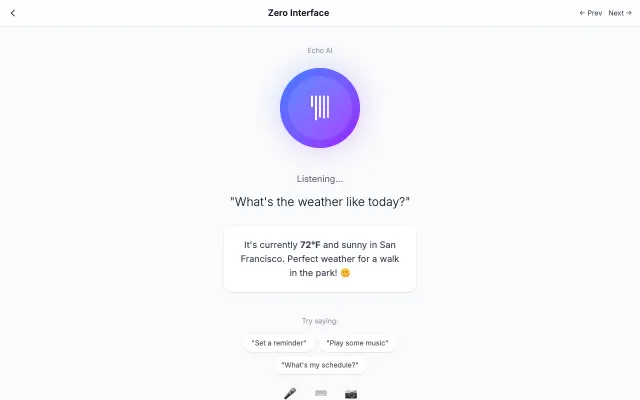
The interface disappears, leaving only content and context-aware interactions. Uses AI, voice, and gestures to anticipate user needs.
Futuristic & Tech
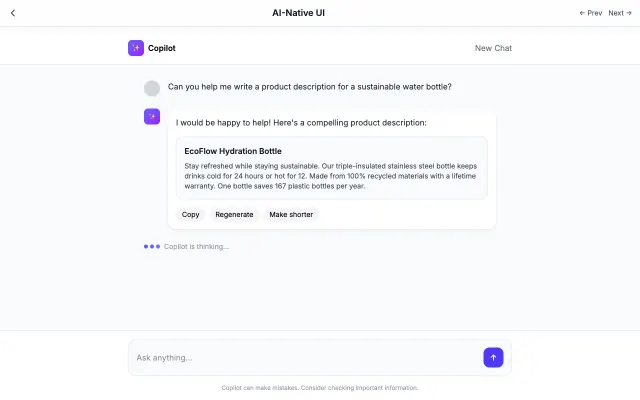
Designed specifically for AI interactions. Features conversational layouts, streaming text, and minimal interface chrome.
Futuristic & Tech
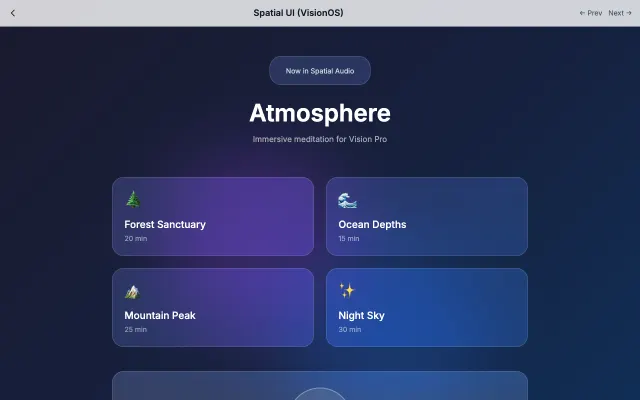
Designed for spatial computing with floating glass panels, depth effects, and gaze-based interactions.
Futuristic & Tech
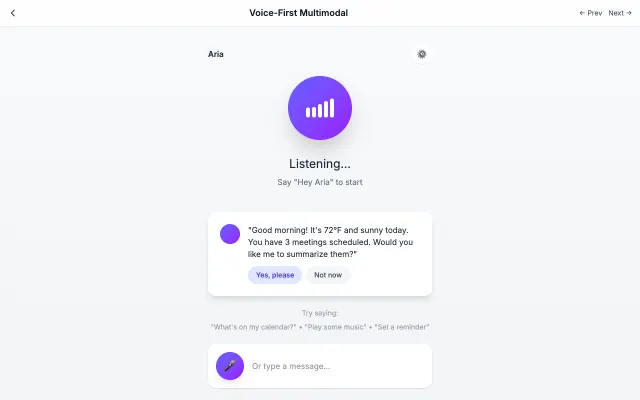
Designed for voice-first interactions with visual feedback for speaking, listening, and processing states.
Futuristic & Tech